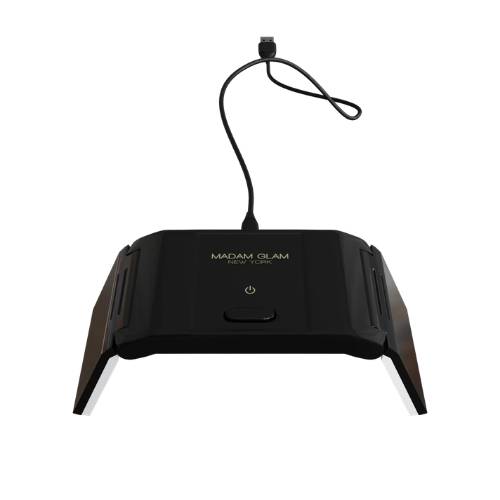
KALI Mini UV/LED Lamp

  • bvseo_sdk, dw_cartridge, 17.1.0, p_sdk_3.2.0
  • CLOUD, getAggregateRating, 3ms
  • reviews, product
  • bvseo-msg: Unsuccessful GET. status = '{0}', msg = {1};
#6033-680138590064
Condition: New
Sold + Shipped by Madam Glam
Free Shipping with purchase of $149.00+

Seller Information

Seller Info

Sold + Shipped by Madam Glam
56 sales
Condition: New

36W | 5V UV/LED Lamp 12 pieces light beads USB power cable Wave lenght: 365+405nm One button setting lamp - 60/120 sec Suitable for all kind of gels, builders and Polygels. Interior mirror for even light distribution. Please remove the blue foil before using it! EASY TO USE: This lamp has one button design. Press ON/OFF button on top to turn the UV/LED Lamp on. Time is set to 60s by default. Hold the ON/OFF button for 2-3 seconds for a 120 seconds cure. GENTLE ON EYES AND SKIN: Comparing with other products, its light is closer to white light, has no harm to eyes and skin. PORTABLE: Comes with micro USB port and USB port which can be connected to laptop, power bank and many more. Makes it possible to do your manicure anytime and anywhere. FOLDING DESIGN: Saves space for storage, portable and easily packed into your handbag. It's the perfect pocket nail lamp for school, office, home use travel. Dimensions (LxWxH): 120 x 73 x 21 mm

Turn On: Press the ON/OFF button located on top of the lamp. 60-Second Cure (Default): Tap the button once for a standard 60-second curing cycle. 120-Second Cure: Press and hold the button for 2–3 seconds to set a longer 120-second curing time. Turn Off: Press the button again at any point to stop the cycle manually.

Online Exclusive purchases from third-party sellers made through SalonCentric must be returned directly to the third-party seller, and cannot be returned to SalonCentric stores. Customers can initiate an Online Exclusive purchase return in two ways on saloncentric.com:

  1. Help Center: Go to the 'Help Center' and initiate a new message. Select 'Issue with an Order' as the subject, choose the relevant order, and select 'Return' from the issue type dropdown. Provide a reason for the return and click 'Submit.'
  2. My Orders: Locate the order in 'My Orders,' and click 'Help with Order.' Follow the same steps as above to select the issue type, provide a reason, and submit the return request.

Click to see more details.

  • bvseo_sdk, dw_cartridge, 17.1.0, p_sdk_3.2.0
  • CLOUD, getReviews, 3ms
  • reviews, product
  • bvseo-msg: Unsuccessful GET. status = '{0}', msg = {1};