Air Basic Airbrush Kit pairs the cordless TEMPTU Air system with compatible TEMPTU airbrush makeup and the essential tools for customizable professional airbrush application. The coordinated system supports smooth, even complexion work and creative artistry.
The streamlined assortment is designed to introduce professional airbrush application with the essential device and cartridge components.
Benefits
- Build customizable coverage in lightweight layers
- Create precise, even application for photo-ready results
- Support professional bridal, salon, studio and on-location artistry
- Mix compatible shades to refine complexion matches
Features
- Cordless, rechargeable handheld device
- Three-speed airflow and SoftTouch Control
- Reusable, top-feed Airpod Pro cartridge
- Portable format for mobile services
Prepping your Airpod Pro:
STEP 1: Remove the tamper seal on tip and clear cap.
STEP 2: Prime the needle by dropping 1-2 drops of S/B Airbrush Cleaner into the inner well. Pull gently on the clear loop.
STEP 3: Remove silver cap and attach the Airpod Pro to the TEMPTU Air.
STEP 4: Spray S/B Airbrush Cleaner through thoroughly.
Tip: Prior to using a water-based formula, spray 1-2 drops of Alcohol 99% through the Airpod Pro to remove any residue of the S/B Airbrush Cleaner.
Using your Airpod Pro:
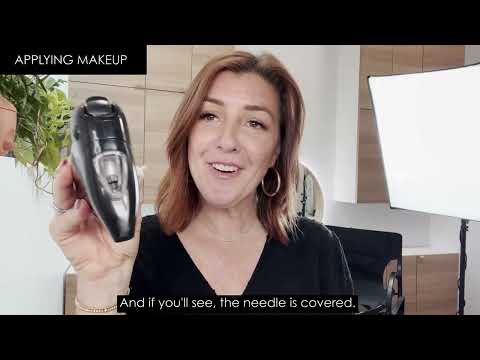
STEP 1: Insert 7-10 drops of makeup into the inner well of the Airpod Pro, needle should be fully covered.
STEP 2: Blend with the TEMPTU Cleaning & Mixing Brush if mixing colors.
STEP 3: Snap clear cap onto well for spill-free application.
STEP 4: Recommended speed setting for use with TEMPTU Air is speed setting 3.
Tip: For faster, easier application and less cleaning, assign an Airpod Pro to each type of makeup (e.g. one for foundation, one for shimmers, one for color like blush).
Cleaning your Airpod Pro:
STEP 1: To clean between colors, choose the cleaner based on the type of formula being used:
For silicone-based formulas use S/B Airbrush Cleaner
For alcohol-based formulas use Alcohol 99%
For water-based formulas use water
STEP 2: Drop desired cleaner into the inner well of the Airpod Pro.
STEP 3: Use TEMPTU Cleaning & Mixing Brush to clean around and under the needle, as well as into the needle tube.
STEP 4: Spray completely through.
STEP 5: Repeat as needed until spray is clear.
STEP 6: When finished, regardless of formula used, always clean the Airpod Pro thoroughly with Alcohol 99% so it is ready to use for the next application.
STEP 7: Never leave makeup sit in the Airpod Pro to dry or harden.
Tip: For no-mess cleaning, spray into Pro Airbrush Cleaning Pot (sold separately).
Proper Care Tips:
Never soak or submerge the Airpod Pro in alcohol.
Never store makeup or other products inside the Airpod Pro.
To care for the TEMPTU Cleaning & Mixing Brush, it is best to clean the brush after and smooth the bristles down to help dry back to shape.
Each Airpod Pro is designed to last up to 120 uses with proper care and depending on frequency of use.
Tip: When working with different types of formulas, always clean thoroughly with Alcohol 99% and leave to dry before moving to a new formula or assign an Airpod Pro to each formula (e.g. one for silicone-based, one for water-based).
S/B Airbrush Cleaner: Cyclopentasiloxane


/max=1000x1000 "Air Basic Airbrush Kit")
/max=550x550 "Air Basic Airbrush Kit")