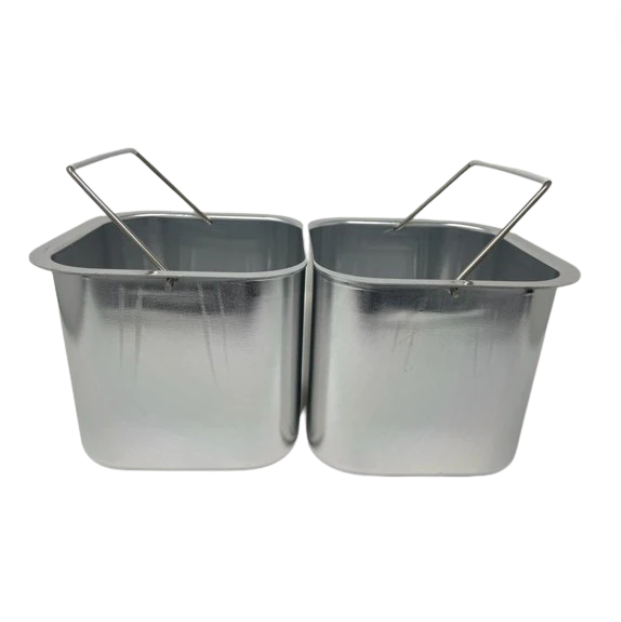
Deo 2.15kg / 4.75lb Removable Bucket x 2

  • bvseo_sdk, dw_cartridge, 17.1.0, p_sdk_3.2.0
  • CLOUD, getAggregateRating, 20ms
  • reviews, product
  • bvseo-msg: Unsuccessful GET. status = '{0}', msg = {1};
#2239-030424
Condition: New
Sold + Shipped by Deo Beauty Products
Free Shipping with purchase of $50.00+

Seller Information

Seller Info

Sold + Shipped by Deo Beauty Products
959 sales
Condition: New

**DEO Beauty Professional Removable Wax Buckets – Pack of 2** Make waxing treatments more convenient and efficient with the DEO Beauty Removable Inner Wax Buckets. Designed for professional salon use, these replacement buckets allow you to use different types of depilatory and paraffin wax within the same wax warmer, helping to minimise cleaning time and prevent wax contamination. Each bucket features a practical carrying handle for easy removal, handling and replacement. **Key Features:** - **Pack of 2:** Two removable inner wax buckets included. - **Versatile Waxing:** Suitable for use with different types of depilatory and paraffin wax. - **Convenient Handling:** Integrated handles make lifting and changing buckets easier. - **Hygienic & Practical:** Helps keep different wax types separate and reduces cleaning between changes. - **Protects Your Wax Warmer:** Use removable inner buckets to help keep the main wax warmer clean. - **Professional Quality:** Designed for professional salon and beauty use. **Compatibility:** Designed to fit the DEO 10–12lb Digital LED Clock Wax Warmer (930588). **Brand:** DEO Beauty **Quantity:** 2 removable buckets **Capacity:** 2.15kg / 4.75lb (as specified in product name)

Online Exclusive purchases from third-party sellers made through SalonCentric must be returned directly to the third-party seller, and cannot be returned to SalonCentric stores. Customers can initiate an Online Exclusive purchase return in two ways on saloncentric.com:

  1. Help Center: Go to the 'Help Center' and initiate a new message. Select 'Issue with an Order' as the subject, choose the relevant order, and select 'Return' from the issue type dropdown. Provide a reason for the return and click 'Submit.'
  2. My Orders: Locate the order in 'My Orders,' and click 'Help with Order.' Follow the same steps as above to select the issue type, provide a reason, and submit the return request.

Click to see more details.

  • bvseo_sdk, dw_cartridge, 17.1.0, p_sdk_3.2.0
  • CLOUD, getReviews, 5ms
  • reviews, product
  • bvseo-msg: Unsuccessful GET. status = '{0}', msg = {1};